![KG logo sininen.png]](https://support.eduhouse.com/hs-fs/hubfs/KG%20logo%20sininen.png?height=40&name=KG%20logo%20sininen.png)
Signing up for a Digital Classroom is easy. The exact registration process depends on whether you're signed in and whether the Digital Classroom is included in your current access rights.
If you're not signed in
Browse the Digital Classroom listing and open the Digital Classroom you're interested in. Then select Sign up.

If the Digital Classroom consists of multiple sessions, you can first select the start date that suits you best.
You will then be asked to sign in if you already have a user account. By signing in, the system checks your access rights and automatically registers you for the Digital Classroom if it is included in your licence.
If you do not wish to sign in, or if you do not have a user account, you can continue by completing the registration form.
Registration options include:
- Contract or licence customer
- Invoice
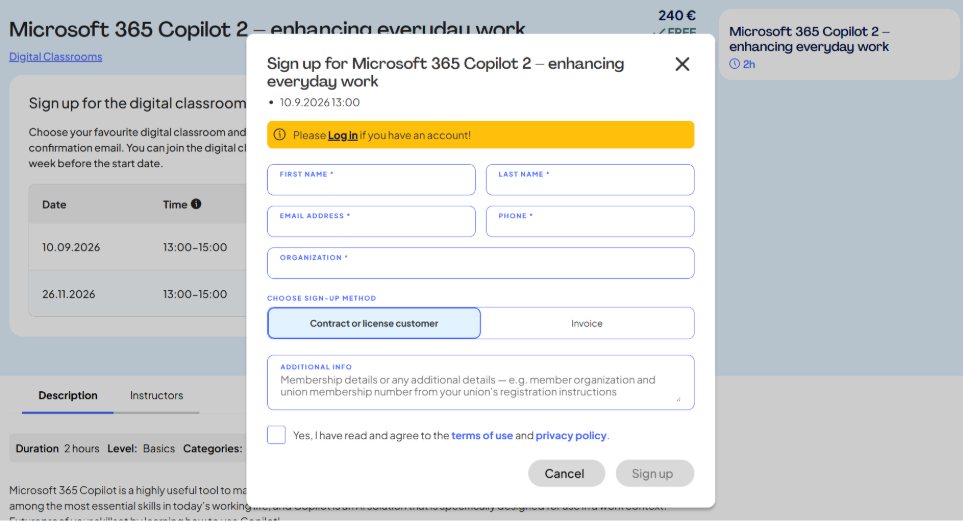
When you submit the form, your registration is sent to Eduhouse for processing and approval. For this reason, your registration may not be confirmed immediately.
If you're signed in and have access to the Digital Classroom
You can browse Digital Classrooms either through:
- The Digital Classroom listing, or
- The Digital Classrooms tab under My Topics
- Open the Digital Classroom you want and select Sign up


Because the Digital Classroom is already included in your organisation's licence:
- You do not need to fill in a registration form
- There is no separate purchase process
- You receive an immediate registration confirmation
What if the Digital Classroom is not included in my access rights?
If you try to open a Digital Classroom that is not included in your licence, you will be asked to sign out before proceeding with the registration.
After that, you can view the Digital Classroom and register for it as a paid participant in the same way as a user who is not signed in.
💡You will receive an Eduhouse calendar invitation, including the Teams meeting link, approximately one week before the training begins.