![KG logo sininen.png]](https://support.eduhouse.com/hs-fs/hubfs/KG%20logo%20sininen.png?height=40&name=KG%20logo%20sininen.png)
If You're Not Logged In
You can browse the entire Digital Classroom catalogue and see the prices of any trainings that are not included in your licence.
When you select a training and click Sign Up, you'll first be prompted to log in. This allows the system to check whether you already have an account and whether the selected training is included in your licence.
If the training is included in your licence, you can register immediately without going through a purchase process.
You can also continue without logging in, for example if you do not have an account. In that case, you'll complete the registration form directly and choose the option that matches your situation:
- Contract or licence customer
- Invoice
After that, you can submit your registration.
If You're Logged In and Have Access to Digital Classrooms
You can browse Digital Classrooms through either:
- The Digital Classroom catalogue
- The Digital Classroom tab under My Subject Areas
When you find a Digital Classroom you're interested in:
- Open the training details
- Select a training date
- Click Sign Up
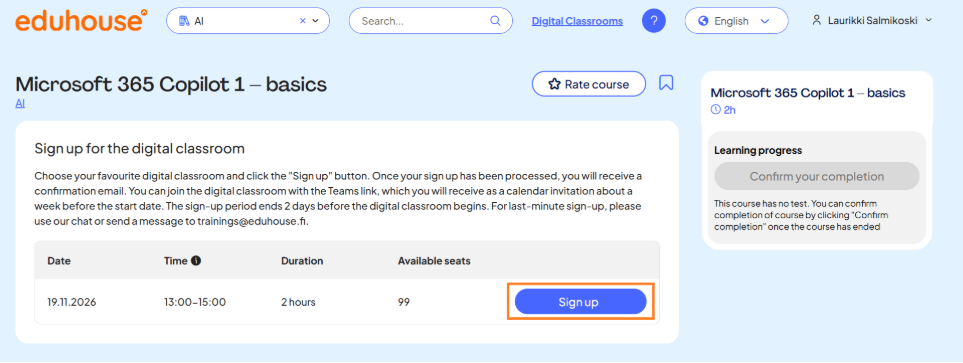
Because the training is already included in your licence, there is no pricing or purchase step. A registration confirmation will be sent to you automatically by email.
If you try to open a digital classroom that is not included in your licence, you'll be asked to log out first. After that, you can view and register for the training as a paid participant in the same way as a user who is not logged in.
💡Even without logging in, you can still browse and register for Digital Classrooms. However, the registration process includes additional steps to verify your access rights and billing method.